301 Error - Option not found in quote
What Does a 301 Error Mean?
A 301 error occurs when a Seller fails to return the option previously selected by the Buyer in the Search response. This means the option is no longer available. This error can appear in the Quote response and Book response (when an additional Quote request is needed for the Seller).
Example:
"errors": [
            {
              "code": "",
              "description": "Option not found in quote",
              "type": "301"
            }
          ]
What Is the Difference Between a 204 Error and a 301 Error?
- A 204 error in a Quote response means the Seller did not provide any options for the availability request linked to that method.
- A 301 error occurs when the Seller provides results, but none match the option previously selected by the Buyer.
Secondary Search Operations in Quote
Aligning our Booking Flow with the Seller's system is a priority. In some cases, our Quote method involves multiple operations, requiring a second Search request to the Seller to confirm option availability and verify necessary Quote data.
Because this second Search transaction is embedded directly within the Quote logs (Seller Connector logs), it is encoded and cannot be read directly from the main Quote log details. However, you can retrieve the complete transaction details—including the secondary Search run within the Quote—directly in the Logging App.
Retrieve the secondary Search log from a Quote
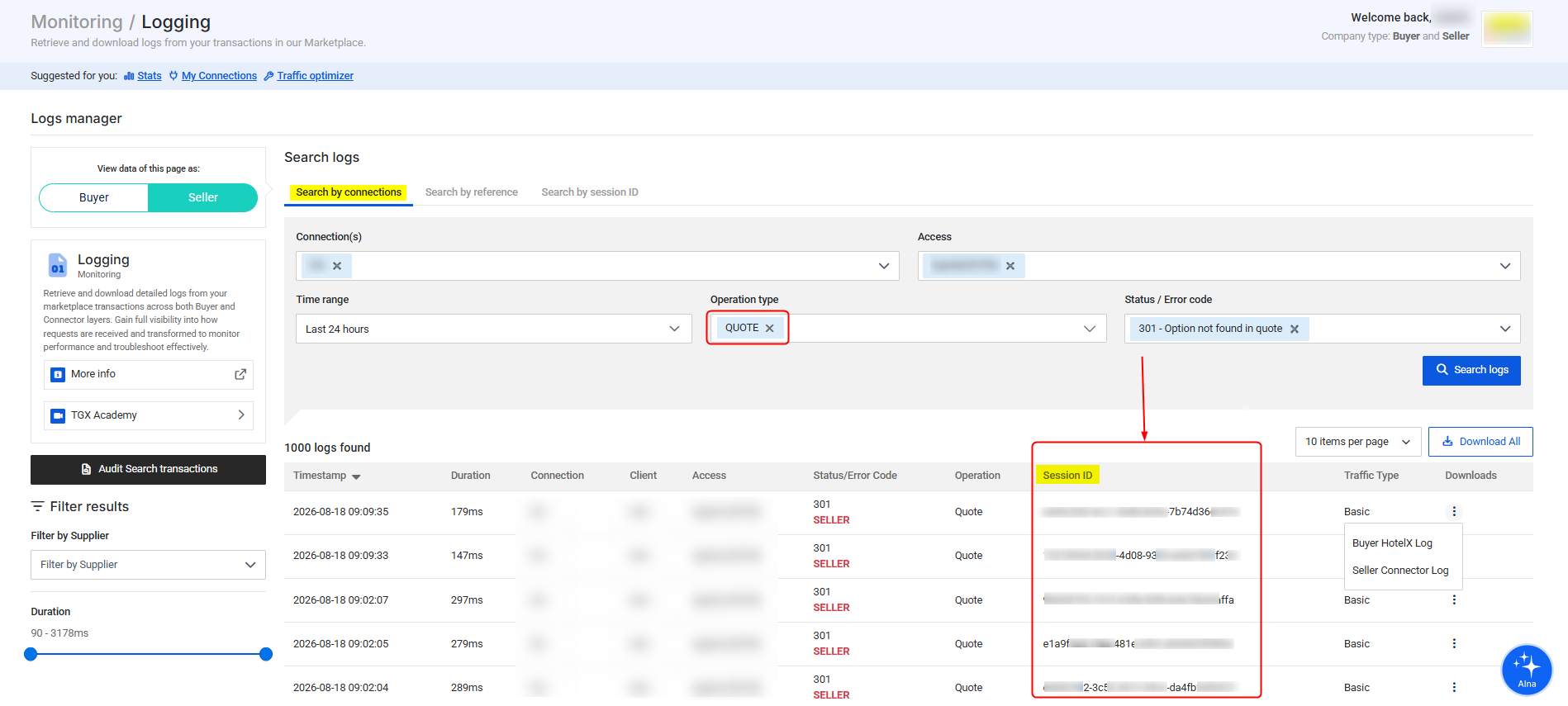
- Open the Logging App and select Search by connections.
- Filter the logs using the relevant access or connection, time range,
QUOTEas the operation type, and the status or error code. Select Search logs. - Find the relevant Quote log and copy its Session ID.
- Add
Searchto the selected Operation Types filter.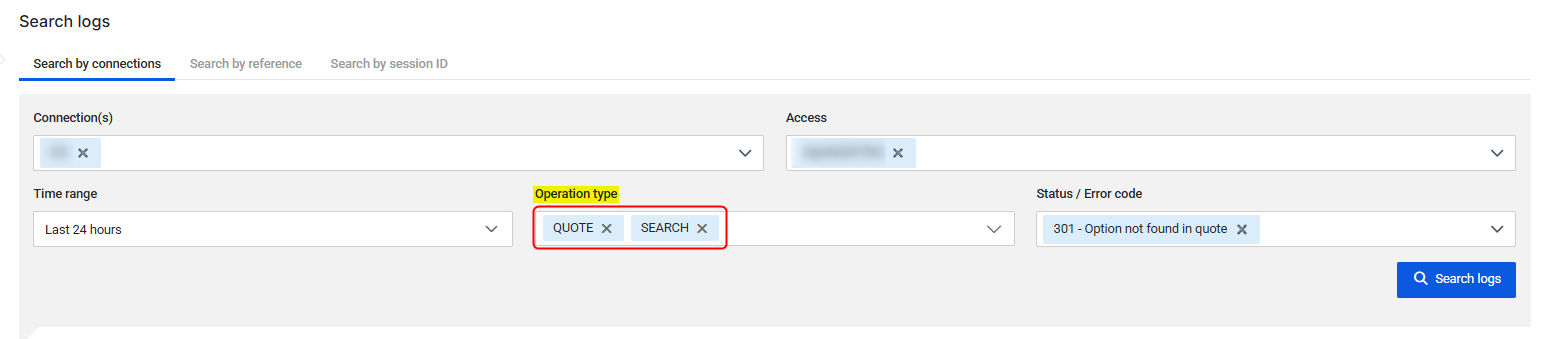
- Open the Search by session ID tab and paste the Session ID.

- Review the two returned log entries:
- Quote: The original Quote transaction.
- Search: The secondary Search transaction run for that Quote.
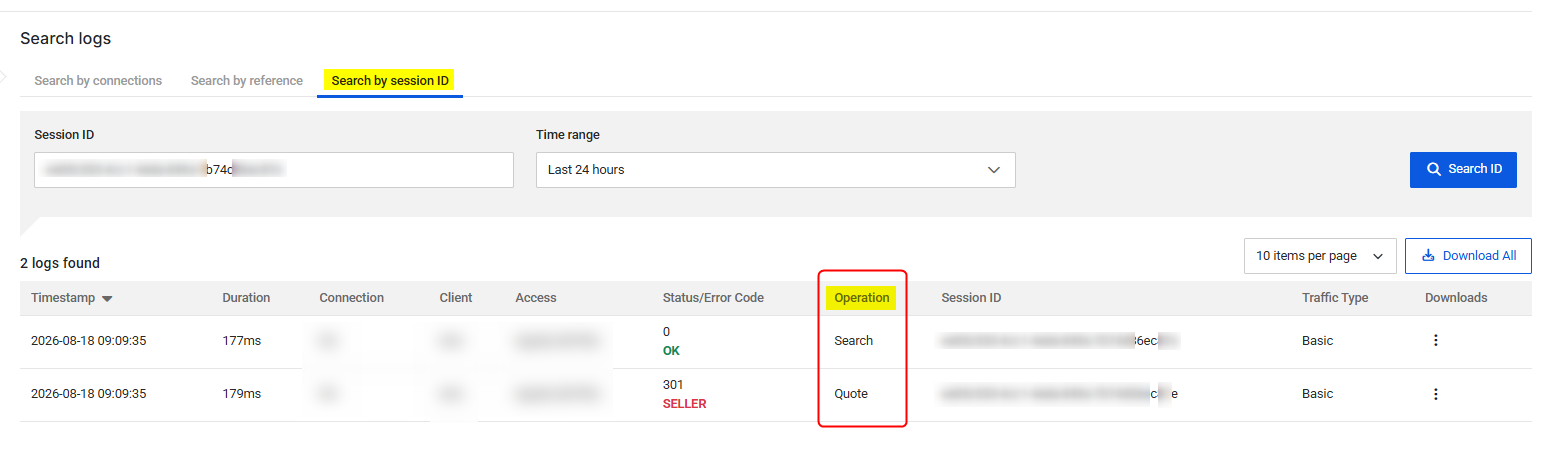
You must add "Search" to the Operation Type filter before moving to the "Search by session ID" section.
Understanding Quote Subcodes and Cascade Validation
To provide better traceability and help you identify exactly why an option was not found, our system performs a cascade validation during the Quote phase. The process evaluates the availability response in a strict order:
- Hotel
- Board
- Parameters
- Payment
- Rooms
The validation stops at the first level that fails to find a match. The level where the process stops determines the diagnostic reason and the corresponding subcode.
Diagnostic Subcodes
The following subcodes act as a quick reference to locate the functional reason behind the error:
- 200 - Hotel not found: The requested hotel code does not exist in the Seller's response, or the availability dropped between the search and the quote.
- 201 - Board not found: The hotel was found, but the requested board type either does not exist or contains no usable options.
- 203 - Parameters not found: The hotel and board were found, but no candidates maintain the required parameter combinations (e.g., rate type, promotion). The error will include the keys that failed.
- 202 - Payment type not found: The candidates match the hotel, board, and parameters, but none match the requested payment type. Note: Payment is evaluated after Parameters, even though 202 is numerically lower than 203.
- 204 - Rooms not found: This is the final check. The system cannot reconstruct the complete combination of requested rooms based on count, occupancy, distribution ID, or room code.
How to Read the Diagnostic Trace
The diagnostic reason and trace are included in the description field of the hotelX.quote.errors[] object. They are not separate JSON fields and are not part of the Seller's availability response. The error type identifies the 301 error; the text after Option not found in quote: identifies the reason, and the lines that follow contain the diagnostic trace.
The match counters act as a snapshot of how many results remain compatible after each validation step. They are not separate errors; they show the progressive reduction of valid candidates.
{
  "data": {
    "hotelX": {
      "quote": {
        "errors": [
          {
            "code": "",
            "description": "Option not found in quote: Rooms not found\nTotal options to try to do match: 6\nHotel: 12345 - HotelsMatch=1\nBoard: BB - BoardsMatch=1\nParameters - OptionsMatch=6:\nPayment Type: Merchant - OptionsMatch=6\n\nRooms count: 1 - OptionsMatch=0\nRoom 1 - RoomsMatch=0:\n  OccupancyRefId=1\n  Code=Superior Room\n  Description=Superior Room\n  LegacyRoomId=1#Superior Room",
            "type": "301"
          }
        ]
      }
    }
  }
}
In this example, Rooms not found is the diagnostic reason. The hotel, board, parameters, and payment type all matched successfully. The validation stopped at the room level because RoomsMatch=0, which corresponds to subcode 204 - Rooms not found.
Option not found in quote: Rooms not found
Total options to try to do match: 6
Hotel: 12345 - HotelsMatch=1
Board: BB - BoardsMatch=1
Parameters - OptionsMatch=6:
Payment Type: Merchant - OptionsMatch=6

Rooms count: 1 - OptionsMatch=0
Room 1 - RoomsMatch=0:
  OccupancyRefId=1
  Code=Superior Room
  Description=Superior Room
  LegacyRoomId=1#Superior Room
The log trace shows the same progression as the response: the hotel, board, parameters, and payment type matched, but no valid room match remained. The failed room-level counter, RoomsMatch=0, identifies the reason as Rooms not found and maps to subcode 204.
What Can I Do If I Receive a 301 Error?
When troubleshooting, use the diagnostic trace to your advantage:
- Start with the reason: Read the diagnostic reason and corresponding subcode to find the exact level where the process stopped.
- Check the counters: Look for the last counter greater than zero to confirm what was successfully matched.
- Compare the failed level: Compare only the failed criteria between your request and the Seller's response. Do not investigate levels beyond where the process stopped, as they were never validated.
Additionally, you can follow these standard resolution steps:
- Restart the Booking Process: Since a 301 error indicates that the selected option is no longer available, initiate a new Booking Flow starting from the Search step.
- Reduce Time Gaps: To minimize the occurrence of 301 errors, reduce the time gap between Search and Quote queries.
- Check Availability Issues: Contact the Supplier to verify if the requested properties have low availability, which may cause options to become unavailable, especially during high-demand periods.
If you notice a sudden and consistent increase in 301 errors from a Seller, please contact our Customer Support team for assistance. We are here to help!