FastX Solution Overview
FastX is the new baseline for hotel connectivity with our HotelX API. It is not a separate API: you keep using HotelX, but with a standardized FASTX context and stronger aggregation capabilities.
From 1 January 2026, FastX is the mandatory connection mode for all new Buyers. Existing Buyers using HotelX API can continue as-is, but Buyers facing mapping or aggregation issues are strongly encouraged to upgrade to FastX for improved stability and content quality.
Problem to Solve
Without FastX, Buyers usually face 3 recurring problems when connecting to more Partners:
- Slow onboarding: each new Supplier takes time to configure.
- Too much mapping: hotel, board, and room mappings must be repeated again and again with every new Supplier the Buyer connects.
- More operational load: multiple queries and multiple code systems increase complexity and can reduce performance.
The FastX Solution
FastX gives Buyers one shared code system for hotels, boards, and rooms inside the Travelgate Marketplace. When you activate FastX, your integration shifts from Supplier-specific contexts to one unified context: FASTX.
In simple terms:
- You send one Search with FastX codes.
- Travelgate searches across connected Suppliers.
- You receive standardized data plus Supplier-native data.
- You can aggregate options and apply business rules in the same flow.
This reduces integration effort, improves consistency, and accelerates operations.
Visual flow: standard mode vs FastX mode
In traditional mode, your integration must handle each Supplier's code system separately. For example, the same hotel can have three different identifiers across three Suppliers; as shown in the image, the Buyer must understand all three code formats and launch one query per Supplier code:

With FastX mode, your system works with only one shared language (FastX codes) while Travelgate handles Supplier translation internally:

Why FastX Matters
FastX is not just a technical upgrade—it's a marketplace-wide shift that benefits both Buyers and Sellers.
For Buyers:
- Less mapping overhead: avoid repeating hotel, board, and room mapping work every time a new Supplier is connected.
- Aggregation in one query: receive and compare options from multiple Suppliers in a single Search request.
- Faster Supplier activations: reduce onboarding friction when expanding your Supplier coverage.
- Simpler operations: maintain one unified code system instead of managing multiple Supplier-specific code systems.
- Full transparency: responses include both FastX standardized values and Supplier-native values.
- GIATA compatibility: FastX codes align with GIATA's standardized identifiers (available as
travelgate; see GIATA Multicodes). - Scalable growth: expand your Supplier portfolio without proportionally multiplying technical complexity.
- Verified Seller badge: Suppliers who have validated 80% or more of their hotel and board mappings receive a FastX Verified Seller badge, visible in the Travelgate Network. It is a validation-coverage indicator — not a quality certification for every individual mapping.
For Sellers:
- Reduced mapping effort: validate hotel and board mappings once, then serve all FastX Buyers with standardized codes.
- Faster onboarding with Buyers: standardized codes eliminate mapping back-and-forth cycles, accelerating go-live timelines.
- Improved portfolio consistency: validation workflows help Sellers review hotel and board correspondences across the Marketplace.
- Single-language distribution: one shared code system reduces operational friction across all Buyer integrations.
How FastX Codes Work
To support standardization across the Marketplace, Travelgate generates unique FastX codes for three asset types: hotels, boards, and rooms.
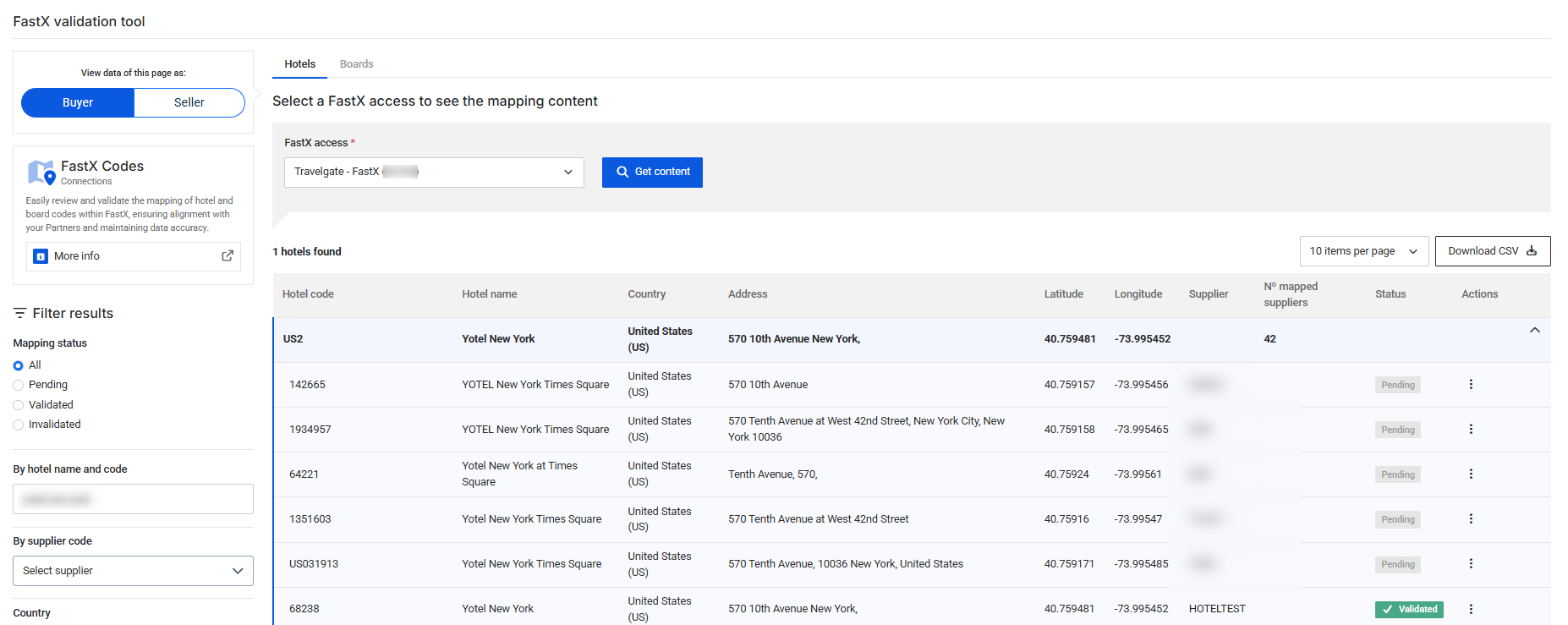
- Hotels & boards: Travelgate creates persistent, standardized codes. The FastX Codes tool lets Sellers validate mappings and Buyers track which Suppliers are matched to each code.
- Rooms: Travelgate generates codes at search time (see Room Mapping below).
Hotel and Board Mapping
Hotels and boards are mapped once and Travelgate provides standardized codes via:
- The HotelX API
- The FastX Codes tool (visual interface for validation)
Validation workflow:
- Sellers validate mappings using reference data: hotel name, country, address, and coordinates.
- Mapping status appears in FastX Codes as
validated,pending, orinvalidated. - This visibility ensures quality and consistency across the production environment.
What each status means for your booking flow:
- Validated — Seller confirmed the mapping
- Pending — Awaiting Seller review; available by default, blocked only if you enable Validated-only mode
- Invalidated — Seller rejected the mapping; never allowed
By default, your booking flow accepts both validated and pending codes. If your business requires only Seller-confirmed mappings, you can switch to Validated-only mode in your API Settings.
Room Mapping
Unlike hotels and boards, room descriptions are highly dynamic and change daily across Suppliers. Because of this, there is no static room master list. Instead, FastX generates standardized room codes and descriptions at search time when Supplier availability is received.
When availability arrives, Travelgate's AI-based process analyzes Supplier room descriptions and detects key components:
- Category (Standard, Deluxe, Basic, etc)
- Type (Room, Studio, Apartment, etc)
- Capacity (Single, Twin, Double, Triple, etc)
- Environment (Shared Bed, Women Only, etc)
- View (Ocean, Sea, Park, Garden, etc)
- Features (Non-Smoking, Air Conditioning, Kitchenette, etc)
- Beds (Queen, Double, King, etc)
- Bedrooms (1, 2, 3, etc)
Travelgate then creates a standardized FastX room code and description, and your response includes both the Supplier's original text and the FastX standardized version. This gives you one comparable room definition across multiple Suppliers.
Room standardization example — seven different Supplier descriptions, one FastX room code:
| Supplier | Supplier Room Description | FastX Room Code | FastX Room Description |
|---|---|---|---|
SUP1 | Sea View Double Room (BB BAR FLEX) | str--AA--d-- | Standard Double Room views Sea |
SUP1 | Sea View Double Room (RO BAR FLEX) | str--AA--d-- | Standard Double Room views Sea |
SUP2 | DOUBLE SEA VIEW | str--AA--d-- | Standard Double Room views Sea |
SUP3 | Double Sea View AI | str--AA--d-- | Standard Double Room views Sea |
SUP4 | double room,sea view | str--AA--d-- | Standard Double Room views Sea |
SUP5 | Habitacion doble con vistas al mar 2A | str--AA--d-- | Standard Double Room views Sea |
SUP6 | Main Building Double Seaview Room | str--AA--d-- | Standard Double Room views Sea |
Aggregating Results with Preference Plugin
Now that your responses are standardized across Suppliers, FastX enables powerful aggregation. When multiple Suppliers return similar options (same hotel, board, and room), the Preference plugin helps you select the most relevant option per group.
How it works:
- Group equivalent options using your aggregation key (typically:
hotel + board + room) - Apply your Preference rule to select one winner per group
- Two modes available:
- Default (cost-optimized): lowest-priced option wins automatically
- Custom (business-driven): your rules determine the winner
An aggregation key groups options according to the selected FastX values. Before treating grouped options as interchangeable, review any Supplier-native attributes that are material to the commercial or customer-facing use case.
📋 Aggregation example: "Hotel Santo Domingo" search
Raw Search Results — you receive 6 options across 3 Suppliers:
| Room Type | Board | Supplier | Price |
|---|---|---|---|
| Standard Room | All Inclusive | SUP1 | 100.00€ |
| Standard Room | All Inclusive | SUP2 | 101.50€ |
| Standard Room | All Inclusive | SUP3 | 112.50€ |
| Suite Deluxe | All Inclusive | SUP1 | 192.00€ |
| Suite Deluxe | All Inclusive | SUP2 | 189.00€ |
| Suite Deluxe with Jacuzzi | All Inclusive | SUP3 | 218.00€ |
After Grouping by aggregation key (hotel + board + room):
Group 1: Standard Room + All Inclusive
- 100€ (SUP1)
- 101.50€ (SUP2)
- 112.50€ (SUP3)
Group 2: Suite Deluxe + All Inclusive
- 192€ (SUP1)
- 189€ (SUP2)
Group 3: Suite Deluxe with Jacuzzi + All Inclusive
- 218€ (SUP3)
Winners with Default Mode (cheapest price per group):
| Group | Winner | Price | Reason |
|---|---|---|---|
| Group 1: Standard Room | SUP1 | 100.00€ | Cheapest option |
| Group 2: Suite Deluxe | SUP2 | 189.00€ | Cheapest option |
| Group 3: Suite Deluxe with Jacuzzi | SUP3 | 218.00€ | Only option |
Winners with Custom Mode (your business rules):
Example rule: "Prioritize SUP2 when available, even if up to 2% more expensive"
| Group | Winner | Price | Reason |
|---|---|---|---|
| Group 1: Standard Room | SUP2 | 101.50€ | Preferred Supplier rule (within +2%) |
| Group 2: Suite Deluxe | SUP2 | 189.00€ | Preferred Supplier rule |
| Group 3: Suite Deluxe with Jacuzzi | SUP3 | 218.00€ | Only option (rule applies when multiple) |
For complete API implementation details and all available rules, see the Preference plugin documentation.
Putting It All Together: Your FastX Search Flow
Once FastX is activated, your search workflow becomes:
- Send one Search request with FastX codes (instead of per-Supplier contexts).
- Travelgate queries all eligible Suppliers in parallel, translating your FastX codes to each Supplier's native codes internally.
- Responses arrive standardized with FastX room codes, hotel codes, and board codes—plus original Supplier values for transparency.
- Apply Preference rules to aggregate equivalent options and select winners based on cost or your custom logic.
- One unified result set replaces what would have been multiple queries with multiple code systems.
You maintain full control via:
- Access/Supplier API filters: include/exclude specific Suppliers per request
- API Settings: manage Supplier routing and default aggregation behavior from the Platform
In summary, FastX transforms hotel connectivity by replacing fragmented, per-Supplier workflows with a unified, standardized approach.
What you get:
- One standardized code system (FastX) instead of multiple Supplier systems
- Standardized room descriptions generated at search time via AI
- Clean aggregation through Preference plugins (cost-optimized or custom business rules)
- Parallel queries across multiple Suppliers in a single Search request
- Full transparency with both FastX and Supplier-native values in responses
The impact: Reduce integration friction, scale Supplier coverage faster, and apply consistent business logic across your entire marketplace presence.